


HOW TO ADD THUMBS UP RATING SYSTEM IN BLOGSPOT POST - HELPING SALU
HOW TO ADD THUMBS UP RATING SYSTEM IN BLOG-SPOT POST
Installing the Thumbs up rating system on Blogger blog is great way to let readers easily express their opinion. Visitors after reading your post often don't have enough time to write a comment about it, but if there is a Thumbs rating widget below that post, everyone can easily click the suitable star and in this way let you know what he thinks about the entry. Also, the rating average of each post can show it's quality to another visitors and encourage them to see it. So, using simple star rating gadget for blogger can give you many benefits and make your blog more attractive.
ALSO READ |HOW TO ADD THE SOCIAL MEDIA ICON IN BLOG
So We Tell You How To Add Thumbs Up Rating System On The Blogger Post With The Help Of 2 Simple And Easy Step So Lets Start Now
FIRST OF ALL PLEASE CHECK RESULT OF THIS WIDGET
1


STEP 1 HOW TO ADD THIS WIDGET AUTOMATICALLY IN POST
TO ADD THIS WIDGET AUTOMATICALLY
SO PLEASE CLICK HERE
When You Click On (Click Here ) Another Website is open
1. CLICK ON THE (ADD TO BLOGGER) BUTTON

ALSO READ |HOW TO ADD THE SOCIAL MEDIA ICON IN BLOG
THEN THE BUTTON WILL FORWARD YOU TO BLOGGER ( ADD PAGE ELEMENT ) PAGE .LEAVE THE TITLE EMPTY AND CLICK ON THE ( ADD WIDGET) BUTTON
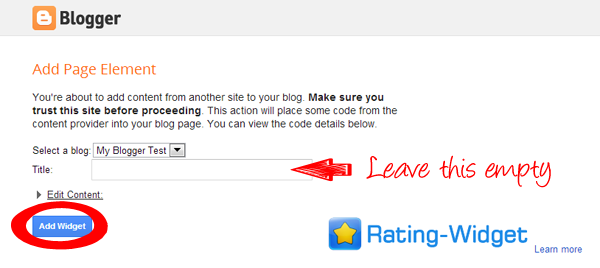
3 . NOW ENJOY YOUR FREE THUMBS UP WIDGET IN YOUR BLOGGER POST (THE WIDGET SHOULD APPER BELOW EACH OF YOUR POSTS AUTOMATICALLY )
STEP 2 HOW TO ADD THIS WIDGET CUSTOMARILY
If you use a custom Blogger template, it may happen that the widget will not be able to locate the place where it should be displayed and it will not work properly. If this happens, then install the widget manually. To do this, click above on Show Widget Code (bottom right corner of the settings block) and copy the code that will be displayed. Next go to your Blogger dashboard and go to page "Theme". Click "Edit HTML" button, then click anywhere inside the content area and press "ctrl" + "F" keys. In the search box that appears at the top-right corner of content area, put text: <data:post.body/> and press "enter" on your keyboard. You will find line "<data:post.body/>" in your blog template. Below that line paste the "Widget Code" you copied click here to copy the code . Repeat this step and paste the widget code below each of "<data:post.body/>" string in your blogger template. Next click "Save theme" button and that's all - now the thumb rating widget should appear below each of your blogger posts

THANKS FOR VISIT
IF YOU LIKE THIS HELPFUL POST SO PLEASE THUMPS UP
https://todaynewspk.win/k4L6
https://todaynewspk.win/RVuPnVAo
Installing the Thumbs up rating system on Blogger blog is great way to let readers easily express their opinion. Visitors after reading your post often don't have enough time to write a comment about it, but if there is a Thumbs rating widget below that post, everyone can easily click the suitable star and in this way let you know what he thinks about the entry. Also, the rating average of each post can show it's quality to another visitors and encourage them to see it. So, using simple star rating gadget for blogger can give you many benefits and make your blog more attractive.
ALSO READ |HOW TO ADD THE SOCIAL MEDIA ICON IN BLOG
So We Tell You How To Add Thumbs Up Rating System On The Blogger Post With The Help Of 2 Simple And Easy Step So Lets Start Now
FIRST OF ALL PLEASE CHECK RESULT OF THIS WIDGET
1
2
STEP 1 HOW TO ADD THIS WIDGET AUTOMATICALLY IN POST
TO ADD THIS WIDGET AUTOMATICALLY
SO PLEASE CLICK HERE
When You Click On (Click Here ) Another Website is open
1. CLICK ON THE (ADD TO BLOGGER) BUTTON

ALSO READ |HOW TO ADD THE SOCIAL MEDIA ICON IN BLOG
THEN THE BUTTON WILL FORWARD YOU TO BLOGGER ( ADD PAGE ELEMENT ) PAGE .LEAVE THE TITLE EMPTY AND CLICK ON THE ( ADD WIDGET) BUTTON
3 . NOW ENJOY YOUR FREE THUMBS UP WIDGET IN YOUR BLOGGER POST (THE WIDGET SHOULD APPER BELOW EACH OF YOUR POSTS AUTOMATICALLY )
STEP 2 HOW TO ADD THIS WIDGET CUSTOMARILY
If you use a custom Blogger template, it may happen that the widget will not be able to locate the place where it should be displayed and it will not work properly. If this happens, then install the widget manually. To do this, click above on Show Widget Code (bottom right corner of the settings block) and copy the code that will be displayed. Next go to your Blogger dashboard and go to page "Theme". Click "Edit HTML" button, then click anywhere inside the content area and press "ctrl" + "F" keys. In the search box that appears at the top-right corner of content area, put text: <data:post.body/> and press "enter" on your keyboard. You will find line "<data:post.body/>" in your blog template. Below that line paste the "Widget Code" you copied click here to copy the code . Repeat this step and paste the widget code below each of "<data:post.body/>" string in your blogger template. Next click "Save theme" button and that's all - now the thumb rating widget should appear below each of your blogger posts

THANKS FOR VISIT
IF YOU LIKE THIS HELPFUL POST SO PLEASE THUMPS UP
https://todaynewspk.win/k4L6
https://todaynewspk.win/RVuPnVAo




No comments